Red hat Enterprise 6 has a following
feature such as
Download Red Hat Enterprise edition image ISO here


Burn Downloaded Image iso to a DVD and boot computer using Red hat 6 boot able image and follow below instruction.
1.Select Install or upgrade an existing system option on Display Menu

2. Choose your desired language

3. Select a keyboard type

4. Choose a installation method

5.Skip DVD media test (if you want to test installation media before installation)

6. Select Red Hat 6 graphical installer starts & select next

7. Accepct Pre-Release Installation & Select Install Anyway

8. Select basic storage devices

9. Type a computer name

10. Select your time zone

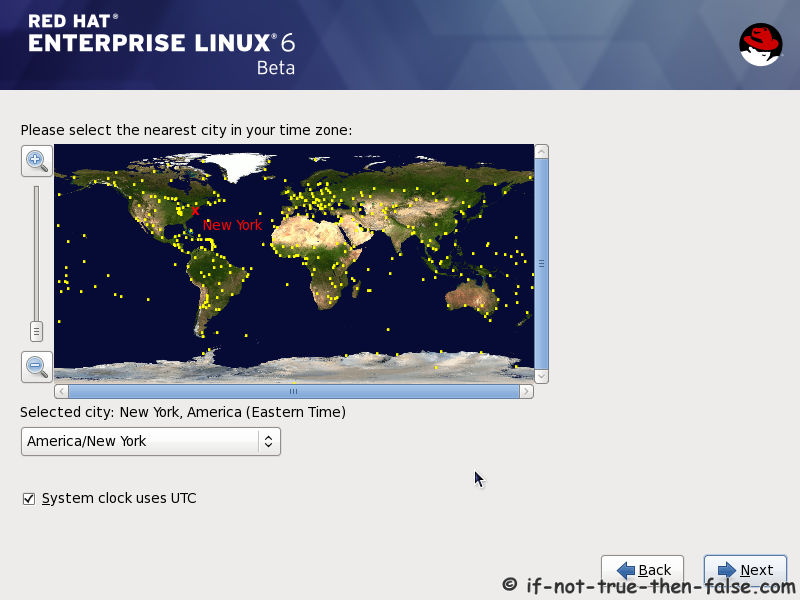
11. Give a password for root user

12. Select what type of installation you want

13. Review your partition layout

14. Click write changes to disc

15. Writing changes to disc

16. Configure boot loader menu

17. Select what kind of softwares do want to install and enable repositories

18. Customize your package selection

19. Checking dependencies condition for installation

21. Installing packages Scenario

22. Installation is complete Scenario

Red Hat 6 Finishing Installation Procedure
23. Selecting Red Hat 6 from grub

24. Booting Red Hat 6 Scenario

25. Red Hat 6 Enterprise Welcome screen

26. Create a normal user

27. Setup date and time

28. Login Red Hat 6 Gnome Desktop screen

29.Default look of Red Hat (RHEL) 6 Gnome Desktop

No comments:
Post a Comment